New Windows installation instructions March 29, 2023.
Please download the databases you purchased from either the web page or from the email you were sent.
Chome will not download some of our databases. Firefox will, Edge will but not the lastest release. Make this change to Edge and it will allow the download Turn off Defender Smartscreen. Also, if there are any further security questions answer 'Keep anyway' or 'Run anyway'
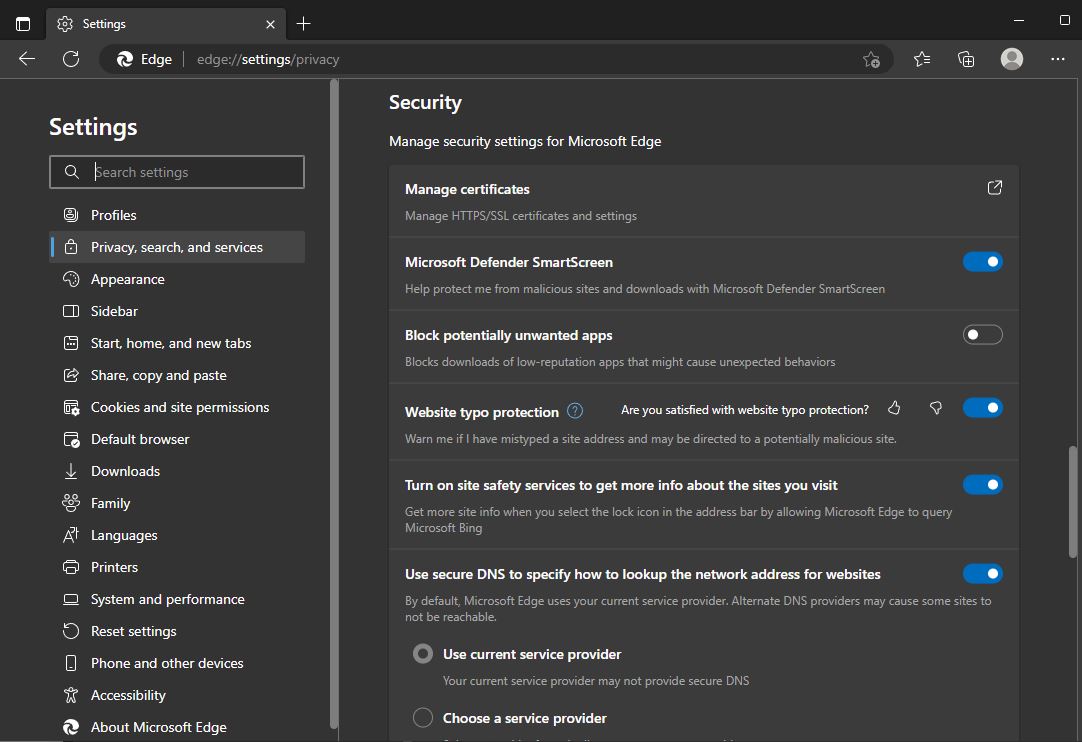
Now download the installation program setup.exe
Once this has been done, please go to the folder where you saved your files, and right-click on the "setup.exe" file and choose Run As Administrator. It will run the setup for the base program. We recommend sticking with the default options here. Once that finishes, it will flash a dialog that says "Time to install purchased database(s)." If you saved your database(s) to the same folder you saved your "setup.exe" file, then it will locate them and run those installations as well.
Once finished, for some installations of Windows Vista/7/8/10/11 and probably any newer version, there is an additional step: if you receive an "Object REXX Execution Failure" upon double-clicking the "Rapid-Fire for Windows" shortcut on your desktop after you attempt to run the program, then you will need to set the shortcut to run as administrator. This can be accomplished by right-clicking on the "Rapid-Fire for Windows" shortcut, left-clicking on "Properties," left-clicking on the "Compatibility" tab, then checking the box next to the phrase "Run this Program as administrator." Click "Apply" then "OK" and whenever you double-click on the icon, it will run the program as administrator.
|